
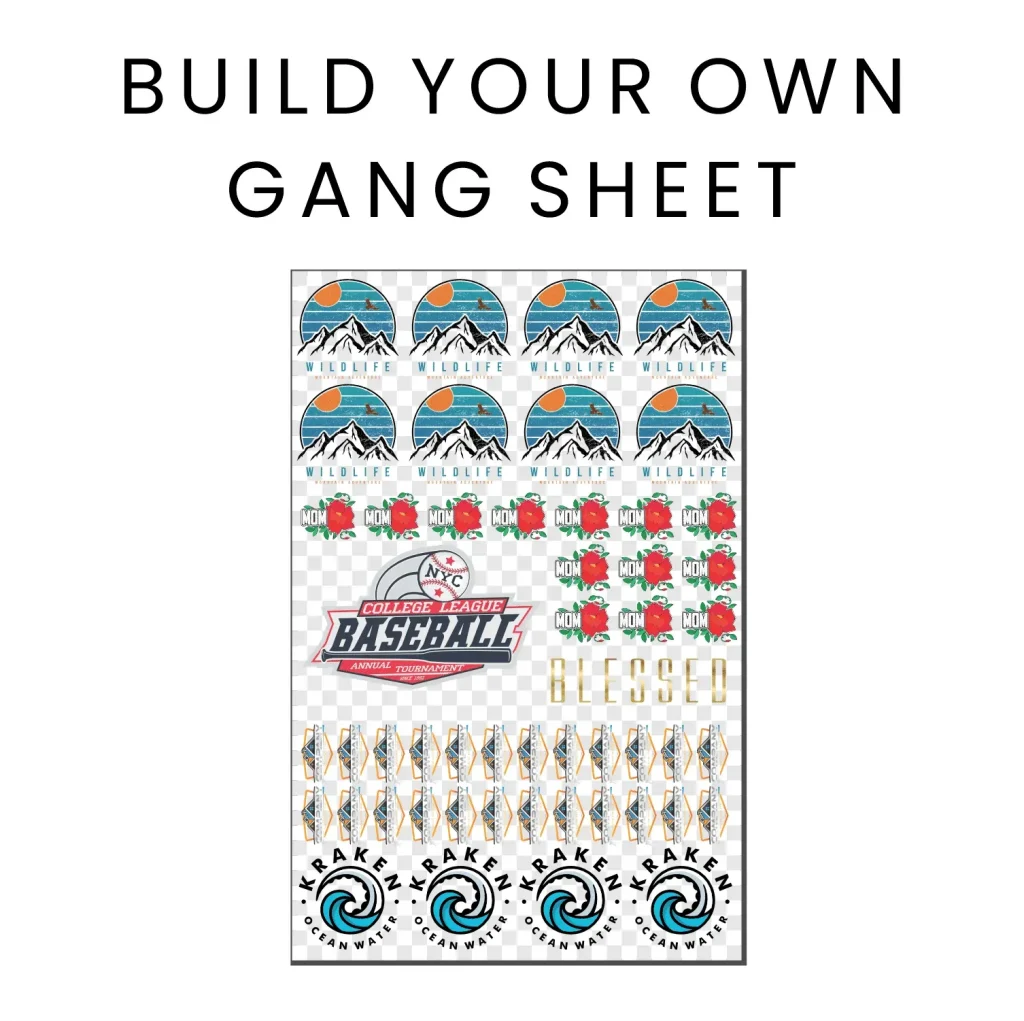
The DIY DTF Gangsheet Builder is an innovative solution for maximizing efficiency in the world of Direct-to-Film (DTF) printing. As you learn to create your own gang sheet layout, you’ll discover how this method not only helps in minimizing material waste but also boosts productivity by allowing multiple designs to be printed simultaneously on a single transfer film. In this guide, we will delve into essential DTF printing tips that cover everything from preparation to curing techniques, ensuring your gang sheets are both beautiful and functional. With proper planning and strategic layout design, anyone can achieve professional-quality prints right from home. Tune into our expert advice to enhance your heat transfer printing projects and create stunning designs with ease.
Exploring the concept of creating a DIY DTF gang sheet can transform your approach to heat transfer projects. Rather than solely focusing on individual designs, a gang sheet aggregates various graphics onto a single sheet of transfer film, offering a smarter way to print while reducing waste. This approach leverages principles of efficient layout planning, ensuring that you make the most of every inch of material. By employing creative techniques and maintaining color accuracy, you can elevate your designs and meet the demands of your printing endeavors. Embrace the art of crafting gang sheets and unlock the potential of your DTF printing experiences.
Understanding the Basics of DTF Printing
DTF printing, or Direct-to-Film printing, is a revolutionary method for transferring designs onto various surfaces, particularly fabrics. Unlike traditional heat transfer printing techniques, DTF allows for vibrant and intricate designs to be transferred using a specialized film. This method not only enhances color vibrancy but also provides greater durability for the transferred images, making it a popular choice among custom apparel makers and print shops. To successfully navigate this printing process, one must comprehend the importance of the gangsheet layout, which optimally organizes multiple designs on a single sheet of transfer film.
A fundamental aspect of DTF printing is ensuring the quality of the transfer film used. The film acts as a medium that carries the design through the printing and transfer process, thus its importance cannot be overstated. Choosing the right transfer film that suits your specific designs and printer is crucial. Films can vary widely in terms of thickness, texture, and adhesive properties, all of which influence the final outcome. Understanding these factors will empower you to make informed decisions, enhancing the overall success of your DTF projects.
Maximizing Efficiency with Gangsheet Layout
Creating an efficient gangsheet layout is pivotal in minimizing waste and optimizing the use of transfer film. A well-planned layout allows for multiple designs to be printed simultaneously, which is not only cost-effective but also enhances productivity. By strategically arranging your designs based on size and color, you can maximize the available space on the transfer film while ensuring that each design is easily distinguishable after the printing process.
Moreover, consider using software tools specifically designed for gangsheet creation. These programs often include features that suggest optimal arrangements based on your designs, helping you visualize the best layout before printing. Incorporating effective gangsheet layout techniques not only streamlines the production process but also contributes to more consistent and high-quality results in your DTF printing endeavors.
Tips for Successful Artwork Preparation
Artwork preparation is a critical step in the DTF printing process. Ensuring that your designs are high resolution and saved in compatible formats is essential to maintain quality during the printing phase. High DPI (dots per inch) graphics are recommended to avoid pixelation and to ensure sharp transfers. Additionally, opting for vector graphics can provide flexibility since these files can be enlarged without losing clarity, making them ideal for creating intricate designs on gang sheets.
Incorporating feedback from test prints is another valuable tip for artwork preparation. By printing a few sample designs on a smaller scale, you can identify potential issues regarding color accuracy and detail preservation before committing to a full print run. This step not only saves materials but also enhances the quality of your final products, ensuring that your DTF prints truly reflect your artistic vision.
Color Management Techniques for Optimal Results
Effective color management is essential for achieving vibrant and accurate prints in DTF printing. Different printers interact with colors in unique ways—therefore, utilizing printer-specific color profiles can significantly enhance your color accuracy. For instance, if your printer has certain color limitations, adjusting your designs to align with those parameters can lead to more consistent results across different prints.
Conducting regular test prints is a key strategy for managing colors effectively. Before embarking on a large run, test how your designs translate from screen to print. This can help you make necessary adjustments to color saturation and brightness, ensuring that the final output matches your expectations. By incorporating these color management techniques, you dramatically improve the quality of your DTF prints, resulting in stunning results that reflect your artistic intent.
Choosing the Right Transfer Film for DTF Printing
The selection of transfer film plays a significant role in the overall quality of your DTF prints. High-quality transfer films are designed to enhance adhesion, provide wash durability, and showcase vibrant colors. When choosing a transfer film, consider its compatibility with your specific DTF printer model—different machines may require specific types or thicknesses of films for optimal performance without compromising quality.
Additionally, familiarize yourself with the various types of transfer films available in the market. For example, some films are specifically designed for dark fabrics while others excel with light materials. Assess the characteristics of these films, such as texture and weight, and consider how they will interact with different designs. By making informed choices about your transfer film, you can enhance the effectiveness of your DTF printing projects.
Mastering Printer Settings for DTF Printing
Understanding and adjusting your printer settings is crucial for the success of your DTF printing process. Each printer has unique specifications, and settings such as temperature, pressure, and ink flow must be carefully calibrated to achieve optimal results. For instance, if the temperature is too high, it might lead to overheating the film, while insufficient pressure may affect the transfer quality.
In addition to adjusting settings for proper adhesion, regularly checking the consistency of your inks is also vital. Inks that are too thick or too thin can impact the transfer quality and the vibrancy of the colors. By continuously fine-tuning your printer settings and maintaining proper ink viscosity, you can achieve consistent, high-quality prints that stand out.
Frequently Asked Questions
What is a DIY DTF Gangsheet Builder and why is it important?
A DIY DTF Gangsheet Builder is a tool used to create layouts for Direct-to-Film printing, allowing multiple designs to be printed on a single sheet of transfer film. It is important because it optimizes material use, reduces waste, and enhances productivity by enabling the simultaneous transfer of multiple designs.
What are the key tips for successful DTF printing using a gangsheet layout?
Successful DTF printing using a gangsheet layout involves thorough artwork preparation, efficient design layout planning, proper color management, and selecting the right transfer film. Additionally, ensuring correct printer settings and effective curing techniques are crucial for quality results.
How can I prepare my artwork for a DIY DTF gangsheet?
To prepare your artwork for a DIY DTF gangsheet, ensure your designs are high resolution (300 DPI), save them in compatible formats like PNG or TIFF, and simplify complex details to maintain clarity during the transfer process.
What should I consider when selecting transfer film for DTF printing?
When selecting transfer film for DTF printing, it’s vital to choose a film compatible with your printer and that meets your project’s requirements in terms of durability and transfer quality. Different films yield varying results, so research is crucial.
What printer settings are essential for optimal results in DTF print transfers?
Essential printer settings for DTF print transfers include adjusting temperature and pressure based on the ink and film types used. Ensuring ink consistency and viscosity is also key to achieving high-quality transfers.
Why is testing important before mass production in DTF printing?
Testing is crucial before mass production in DTF printing to evaluate color accuracy, design layout, and material compatibility. Running a pilot batch helps identify and resolve any potential issues, ensuring quality in larger orders.
| Key Point | Details |
|---|---|
| What is a DTF Gangsheet? | A layout combining multiple designs on one sheet of transfer film to minimize waste and maximize productivity during printing. |
| Artwork Preparation | Use high resolution files (300 DPI), compatible formats (PNG/TIFF), and ensure design clarity. |
| Efficient Layout Planning | Maximize film use to include more designs, leaving adequate space between designs to minimize ink transfer issues. |
| Color Management Techniques | Use appropriate color profiles, conduct test prints for accuracy, and adjust based on printer outputs. |
| Choosing the Right Transfer Film | Select high-quality films that are compatible with your printer to ensure durability and transfer quality. |
| Printer Settings Adjustments | Adjust temperature and pressure settings, and ensure ink consistency for optimal print quality. |
| Curing Transfers Correctly | Properly cure printed film before application, focusing on the correct heat press technique. |
| Testing Before Mass Production | Run pilot batches to evaluate prints for color accuracy and design layout before larger orders. |
| Maintenance of Equipment | Regularly maintain your DTF printer and heat press to ensure performance and print quality. |
Summary
DIY DTF Gangsheet Builder is an essential process for anyone looking to optimize their DTF printing experience. By following the provided tips, you will learn how to properly prepare your artwork, plan your layouts efficiently, manage colors accurately, and select the right transfer films, among other vital elements. These steps ensure not just the effectiveness of your gang sheets but also enhance the overall production quality. With thorough preparation and regular equipment maintenance, you’ll refine your DTF printing technique, resulting in beautiful, durable prints. Embrace the art of DIY DTF gangsheet building, and watch your creative projects come to life!